

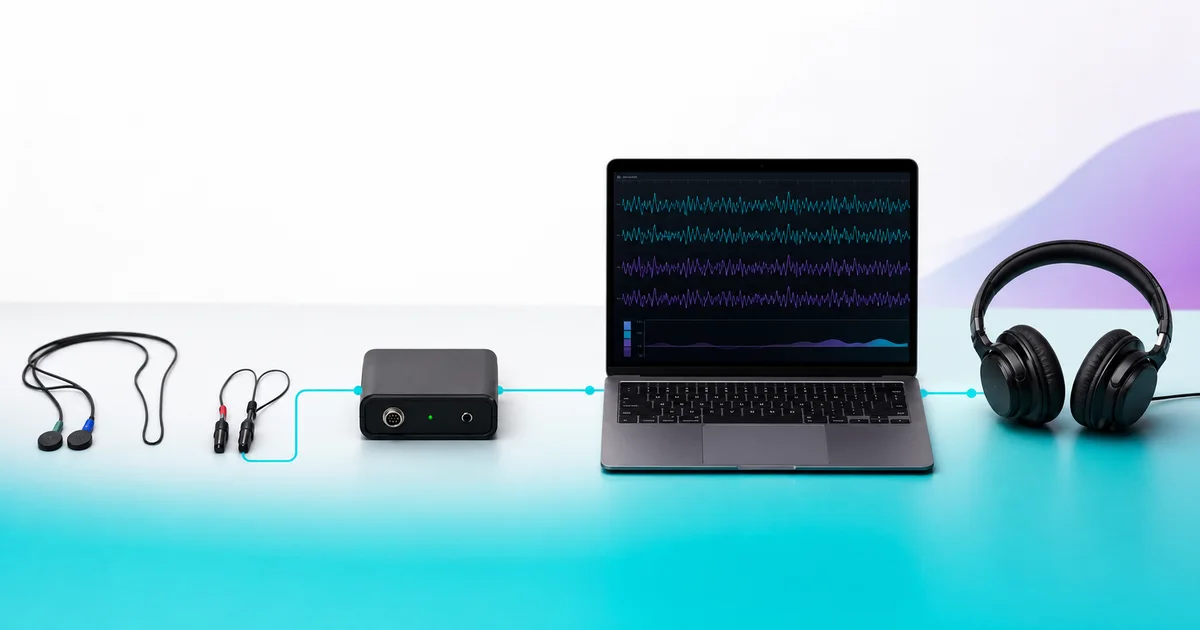
Neurofeedback sensors are the contact points at the front of a larger hardware chain. Each contact point picks up a physiological signal at the location specified by the system. Its lead wire carries that input to an amplifier or interface, which passes it to a computer running the system’s software. The contact points themselves are not the software, the amplifier, or the audio or visual output.
That distinction matters when you compare systems. A product page may use sensor, electrode, lead, amplifier, and headset as if they describe one interchangeable item. They do not. This guide follows the hardware path so you can see what each part does and which specifications to verify. If you want the broader context first, read our overview of what neurofeedback training involves.

The five parts of the equipment path
Professional association materials describe sensors connected to an amplifier and computer. Manufacturer instructions then show how those parts connect in a particular system. Keeping those source types separate helps: a professional reference explains the general category, while the manufacturer manual documents the exact product configuration.
| Part | Its equipment job | What to verify |
|---|---|---|
| Sensor or electrode | Makes contact at the location specified by the system and picks up the signal for the lead wire to carry. | Contact style, quantity, attachment method, and replacement part. |
| Lead wire and connector | Connects each contact point to the next hardware component. | Connector type, color coding, left/right labeling, and care instructions. |
| Amplifier or interface | Receives the sensor signal and passes it to the connected computer system. | Required cable, ports, power, driver, and product compatibility. |
| Computer and software | Receives and processes the incoming data according to that system’s design. | Operating system, license, account, updates, and support requirements. |
| Audio or visual output | Presents the system’s user-facing feedback through the configured media. | Headphones, speakers, display, media settings, and included accessories. |
The International Society for Neuroregulation & Research describes the general sequence as scalp sensors connected to electronic amplifiers and computer software. Its equipment overview also separates sensors, the amplifier, and software into different parts of the system.1 The Association for Applied Psychophysiology and Biofeedback similarly describes biofeedback as using instruments to measure physiological activity and present information to the user.2
Sensor, electrode, lead, and headset are not the same thing
Sensor and electrode are often used for the contact component. A lead includes the wire and connector that link a contact point to the interface. A headset is a wearable structure that may hold one or more contact points, but the word alone does not tell you the sensor count, contact material, signal path, software, or support model.
This is why a comparison based only on appearance can be misleading. Two products may both be described as headsets while using different contacts, connectors, interfaces, software, licenses, and output formats. Conversely, a system with separate leads may perform the same basic equipment jobs through a different physical arrangement. The product documentation should identify every required part.
A concrete NeurOptimal equipment example
The NeurOptimal Getting Started Manual documents a specific connection path: color-coded sensor leads plug into color-coded inputs on the zAmp; a USB cable connects the zAmp to the computer system; and earbuds connect to the system. The manual separately explains applying the contact points with conductive paste.3
As of July 2026, NeurOptimal’s sensor product page describes its sensor set as silver sensors with flat ear clips and flat scalp contacts.4 Those are product-specific details, not a universal specification for every neurofeedback system. Another product may use a cap, a wearable band, dry contacts, paste-based contacts, or another physical configuration.
If you are considering an appointment, Freedom’s neurofeedback session information is the correct place to confirm the current service format. This equipment article does not replace those booking details.
What conductive paste and contact instructions tell you
Some equipment instructions specify conductive paste as part of applying the contact points. Others use a different contact design. The important buying question is not whether one setup looks simpler in a photograph. It is whether the seller supplies the complete, current instructions and the exact consumables or accessories required for that system.
Before using or cleaning any contact component, follow the manufacturer’s instructions for that exact model. NeurOptimal, for example, publishes separate technical-support directions for handling, cleaning, inspecting, and testing its sensor set.5 That documentation is more reliable than a generic cleaning tip copied from a different product.
Seven questions to ask when comparing sensor setups
- What exactly is included? Ask for the sensor set, leads, clips, paste or other contact supplies, interface, cables, computer, software, and audio or display accessories to be listed separately.
- Which contacts are replaceable? Confirm the replacement part name, current source, and whether components are sold individually or as a set.
- What connects the sensors to the computer? A listing should identify the amplifier or interface, cable type, and required ports.
- Which software and license are required? Hardware compatibility does not establish software access. Verify the operating system, license, account, update, and support terms.
- What does the setup procedure require? Look for a dated manual covering contact placement, attachment supplies, connections, software launch, and output configuration.
- How are the components checked and cared for? Use current manufacturer testing, cleaning, storage, and replacement instructions for the exact part.
- Who provides help with a setup problem? Confirm whether support comes from the manufacturer, seller, rental provider, or another party.
What sensors alone cannot tell you
A photo or sensor count cannot tell you whether a complete system fits your practical needs. It does not establish the included software license, update policy, computer requirements, replacement costs, seller support, or rental terms. It also does not answer medical, diagnostic, or outcome questions.
To compare complete-system inclusions rather than one component in isolation, consumers who want to purchase a NeurOptimal system must visit the NeurOptimal website directly. Ask for current written specifications and terms before making a decision.
Sources
- International Society for Neuroregulation & Research: What Is Neurofeedback? Equipment-path sections only; accessed July 31, 2026.
- Association for Applied Psychophysiology and Biofeedback: Standards for Performing Biofeedback Instrument-definition section only; accessed July 31, 2026.
- NeurOptimal Getting Started Manual Hardware-connection and sensor-application sections; accessed July 31, 2026.
- NeurOptimal Flat Tipped Sensors Product description; accessed July 31, 2026.
- NeurOptimal Technical Support Sensor care and test directions; accessed July 31, 2026.
This article describes equipment components only. It does not provide medical advice or evaluate whether a product is appropriate for an individual.
